
See who someone recently followed on Instagram has a short, honest answer: Instagram does not show that list. No screen inside the app lists another account’s recent follows by date. No setting restores that view, and no public list order proves recency. That answer disappoints many searchers, but it protects privacy and prevents false conclusions.
See who someone recently followed on Instagram also has a longer answer worth understanding. A Following list shows who an account follows right now, not when each follow happened. A following count can rise, which proves a change, but not who changed it. Public posts, comments, and mutual labels can hint at a connection, but none of them carry a follow date.
Quick answer: what is visible and what is not
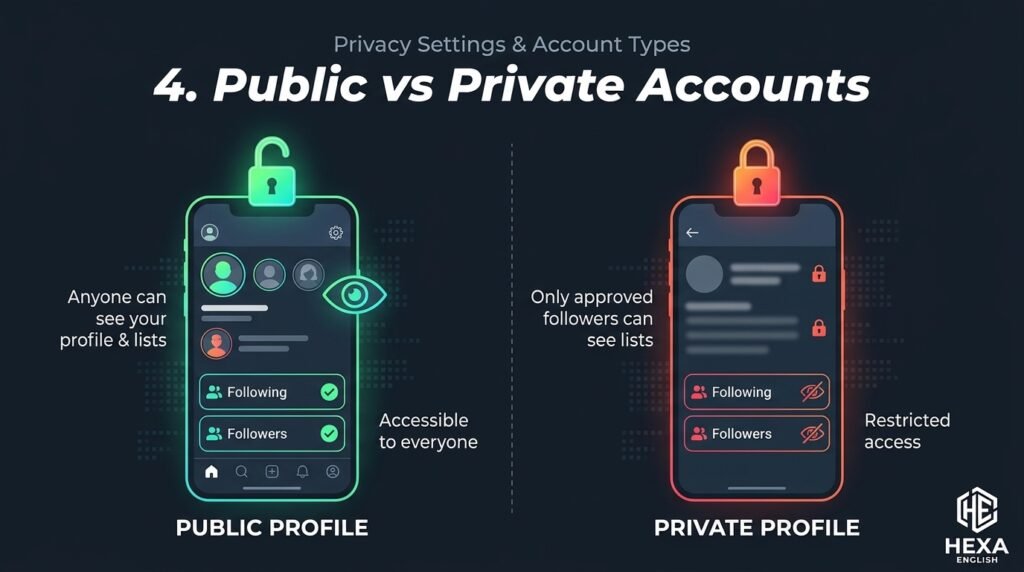
Visible on a public profile includes follower count, following count, and the Following list itself. Public engagement, such as likes and comments on public posts, can also appear in ordinary feeds. Those surfaces show current relationships and public activity, not a dated follow history. A private account’s Following list is visible only to approved followers, with narrower visibility for other relationships.
Not visible for another account includes follow dates, follow order by time, a recent follows sort, and an archive of past follows. Instagram removed the Following Activity tab in October 2019, and nothing replaced it as a dated follow feed. Fone.tips and izood both state that point clearly, with izood adding that no screen, setting, or tool returns a dated list from Instagram itself.
Visible for your own account is different, and that difference causes most confusion. Your own Following list may offer a date sort in some app versions, with newer-first and older-first options, per izood and fone.tips. Your own activity and data download also hold records for your account. Those controls apply to your account only, not to anyone else’s account.
Table of Contents
| What you check | What Instagram shows | What it proves | What it does not prove |
| Public Following list | Current accounts followed | Who is followed right now | When each follow happened |
| Following count | Total number followed | A change happened, up or down | Which account was added or removed |
| Followers list | Current followers | Who follows right now | When each follower arrived |
| Public likes and comments | Public engagement | A public interaction happened | A follow date or a private motive |
| Mutual label, Followed by | Shared connections | A connection exists | When the connection started |
| Your own Following sort | Date followed, in some versions | Your own newest or oldest follows | Anyone else’s follow dates |
| Your own data download | Your own followers and following | Your own account history | Another account’s history |
| Instagram Insights | Your own professional metrics | Your own account performance | Another account’s follow history |
Why the Following list is not chronological
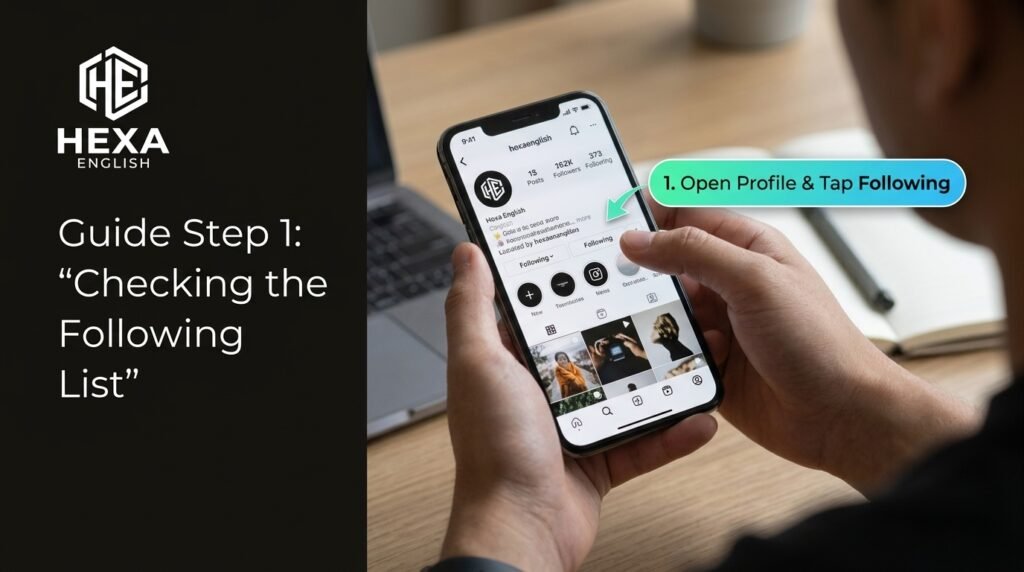
Algorithmic order replaced chronological order for Following lists, just as feeds moved away from strict time order years earlier. Izood explains that Instagram ranks a Following list for the viewer, not by follow date. Mutual connections, accounts the viewer interacts with, and how much the profile owner interacts with each account all shape the order. General popularity and relevance signals also play a role.
Viewer personalization means two people opening the same Following list can see different orders. That fact alone disproves the newest-at-the-top theory, per izood. If order meant date, order would stay the same for every viewer. Instead, order shifts with the viewer, which proves order reflects relevance to the viewer, not history of the profile owner.
Top-of-list persistence also misleads readers. An account that stays near the top is often an account with frequent interaction, not a new follow. Izood answers that exact FAQ: frequent contact ranks an account higher, while recency does not. A creator, a close friend, or a mutual connection can sit near the top for months, even without any new follow action.
Large accounts show the shift most clearly. Lurk notes that years ago, larger Following lists sat closer to reverse chronological order, with newest follows near the top. Instagram then shifted to an algorithmic, viewer-personalized sort, with no formal announcement in the sources reviewed. Smaller lists can look random for the same reason: relevance, not time, decides placement.
Signals that shape list order
Mutual connections push shared accounts toward the top for a given viewer. If you and the profile owner both follow the same account, that account often appears higher for you. That placement tells you about overlap, not about when the profile owner followed that account. Mutual labels confirm overlap, but carry no date.
Viewer interaction also shapes order. Accounts you interact with yourself can rank higher when you open someone else’s list. That personalization makes the list useful for discovery, but useless as a timeline. A list that changes with the viewer cannot serve as evidence about another person’s history.
Owner interaction matters too. Accounts the profile owner interacts with frequently can rank higher, regardless of follow date. A long-followed friend with daily interaction can outrank a brand-new follow with no interaction. Interaction strength and follow recency are different signals, and Instagram blends them in ways it does not publish.
Popularity and relevance add a final layer. Widely followed accounts, accounts related to viewer interests, and accounts with strong engagement signals can rank higher. Those signals help discovery, but they obscure history. A popular account near the top may have been followed years ago, while a new follow sits buried mid-list.
What happened to the Following Activity tab
Following Activity tab once showed what accounts you followed had liked, commented on, and followed, newest first. Instagram removed that tab in October 2019, as reported by TechCrunch on October 7 and cited by fone.tips. The tab was removed for privacy reasons, including concern about monitoring behaviour, per AdvertiserReview and izood summaries. No equivalent tab returned in later app versions.
Removal did not hide everything. Public posts and comments still appear in ordinary feeds, and public Following lists still show current follows. Removal took away the dated activity feed, not every public interaction. That distinction matters: seeing a public comment is not the same as seeing a dated follow log, and neither proves when a follow happened.
Old guides still mislead. Many older pages describe tapping a heart icon and switching to Following, as if that tab still exists. Izood warns that those guides are outdated, since that tab has not existed for years. Any page that still presents that path as current should be treated as stale, not as evidence that a hidden setting exists.
September 2026 claims need care. IGDetective and Lurk pages cite a September 9 2026 change or search peak related to list order. No Instagram announcement was shown in the sources reviewed for this article, so that date should be treated as a tracker-page claim, not a verified Instagram update. The core fact does not depend on that date: list order already failed as a timeline before any 2026 claim.
Own account versus other account: the split that matters
Own account controls exist for account management, not for investigating others. Your own Following list may show a sort control above the list, with date followed options in some app versions, per fone.tips and izood. Fone.tips warns that Instagram Help Center does not document current labels or availability, so controls vary by device and version. If no sort appears, default order should not be read as date order.
Other account lists offer no date sort, no timestamps, and no history view. A visitor should not assume another person’s list offers the same controls as their own list, per fone.tips. That asymmetry is intentional: Instagram gives you tools for your own account, while limiting what you can learn about others. Treating the two lists as the same leads to false conclusions.
Your Activity and data download hold your own records, not someone else’s. Izood notes that Settings and privacy, then Your Activity, holds actions Instagram keeps on your account, and a complete data download can be requested from the same area. Fone.tips adds that a data download covers your own followers and following, not another account’s history. Those tools help own-account cleanup, not other-account investigation.
Insights for professional accounts also follow the own-account rule. Fone.tips states that Instagram Insights and Meta Business Suite show metrics for a professional account you manage, not another person’s dated follow history. A creator checking their own audience growth can use Insights, while a competitor checking another creator’s follows cannot use Insights for that purpose.
| Account view | Date sort | Timestamps | History | Insights | Data download |
| Your own account | May appear, version dependent | Your own actions in Your Activity | Your own, via download | Your own professional metrics | Your own followers and following |
| Another public account | No | No | No | No | No |
| Another private account, not followed by you | No | No | No | No | No |
| Another private account, followed by you | No, list only if approved | No | No | No | No |
| Your own professional account | Own list only | Own metrics only | Own metrics only | Yes, own account | Own data only |
Public, private, and Threads visibility
Public accounts show follower count, following count, and Following list to people on Instagram, per fone.tips summary of Instagram’s public versus private comparison. Public follow relationships can also remain visible on Threads, even in some private account cases, per the same comparison. That visibility is about current relationships, not about dates or history.
Private accounts limit Following list visibility to approved followers. StealthPeek states that private account lists are visible only to approved followers, and no tool can bypass that limit. SnoopInsta states the same limit in plainer terms: on a private account, you cannot open the list unless you already follow them. Any service promising private list access without approval should be treated as a scam claim.
Mixed relationships need care. Fone.tips notes that a private setting does not hide every follow relationship, since public accounts you follow, or that follow you, can still be seen by people on Instagram and Threads. Relationships involving private accounts have tighter visibility, but the exact boundary depends on both accounts’ settings. Do not assume a private account hides every connection, and do not assume a public list reveals a private history.
Story viewing differs from list viewing. Fone.tips warns that story viewing is different: the owner can see that you viewed a story, while profile and Following list viewing carries no documented notification in the sources reviewed. A live host can see viewer counts, which is not the same as a story viewer list. List viewing and story viewing should not be confused when judging anonymity.
| Account type | Following list visible to | Follow dates visible | Threads note |
| Public account | People on Instagram | No, for anyone | Public relationships can appear on Threads |
| Private account, viewer not approved | No, list hidden | No | Tighter visibility, check live settings |
| Private account, viewer approved | Yes, list only, no dates | No | Still no dates or history |
| Private account owner, public accounts followed | Public relationships may remain visible | No | Per Instagram comparison cited by fone.tips |
| Professional account, own view | Own Insights only | Own metrics only | No other-account history |
Methods compared: what each method actually proves
Native Instagram viewing proves current follows and public engagement, nothing more. Opening a public profile and tapping Following shows who is followed right now, in algorithmic order. That view is free, safe, and accurate for current state, but it cannot answer a recency question. Any article that calls the top of that list “recent follows” is repeating an outdated rule.
Snapshot comparison is a concept, not a native feature. It means comparing a public Following list at two different times and noting names that appear only in the later check. That comparison can show a new name only after tracking starts, never before. It cannot show exact dates, cannot show follows that were added and removed between checks, and cannot work for private lists without approval. Its accuracy depends on check frequency, list size, and whether the account changed during the gap.
Tracker vendor claims fall into two groups that must not be merged. Some vendors claim to re-sort a public list by time, while others claim to date new follows by the day they are first seen during tracking. The first claim, a true chronological re-sort from a single check, conflicts with izood and fone.tips, which state that no public API exposes follow events and no timestamps exist to re-sort. The second claim, a first-seen date, is logically different: it dates detection, not the follow itself. A first-seen date can be useful for forward monitoring, but it is not an Instagram timestamp.
Login-based trackers carry the highest risk in this category. Izood warns that handing Instagram credentials to a tracker can lead to account takeover and breaches Instagram terms, which can lead to a ban. Fone.tips warns that Meta advises against entering passwords into unapproved sites or apps, since a service can gain access to private messages and account settings. UnfollowCheck and FollowBuddy safety pages make the same split: no-login public data or on-device export analysis is structurally safer than a login-based app, while login-based apps carry lock, ban, and credential exposure risks.
Private bypass claims fail on principle. IGUnfollowTracker states that private accounts hide follower data from non-followers, and any tool claiming otherwise is fake or violating terms. RavenTracker states that its service works only for public accounts. StealthPeek states that no tool can bypass private visibility. Those three independent warnings align: private access promises are red flags, not features.
| Method | What it shows | Accuracy for recency | Risk | Best legitimate use |
| Native Following list | Current follows, algorithmic order | None for dates | Low, native app only | Current public relationship check |
| Following count check | Total followed, change over time | Change only, not who | Low, native app only | Quick change signal |
| Mutual label check | Shared connections | Connection only, no date | Low, native app only | Overlap check for research |
| Snapshot comparison | New names after first check | First-seen only, gap dependent | Low if manual and public only | Forward research with consent and public data only |
| Vendor re-sort claim | Claimed newest-first list | Unverified as true follow dates | Medium to high, vendor dependent | Do not rely on it without independent proof |
| Vendor forward tracker | New names dated by first-seen day | First-seen only, not Instagram dates | Medium, vendor and payment dependent | Forward public research only, with safety checks |
| Login-based tracker | Claimed activity, with login | Unverified, plus account risk | High, credential and ban risk | Not recommended |
| Private bypass claim | Claimed private data | None, scam claim | Extreme, fraud and data risk | Never use |
How to read visible signals without inventing dates
Public engagement can hint at a new connection, but it cannot date a follow. Izood notes that a newly followed account may start appearing in story reactions, comment threads, tagged posts, or suggested blocks. Those signals show interaction, not follow timing. An account can interact without following, follow without interacting, or follow long before interacting for the first time.
Suggested for you blocks also mislead as evidence. A suggested account may appear because of mutuals, interests, or algorithmic relevance, not because the profile owner just followed it. Suggested blocks are personalized to the viewer, so they prove even less about another person’s history than a Following list does. Treat suggestions as discovery signals, not as follow evidence.
Mutual labels confirm overlap, not timing. Opening an account and seeing Followed by under its name lists people you follow who also follow that account, per izood. That label confirms a connection exists at check time, but gives no date. A mutual connection can be years old or days old, and the label looks the same in both cases.
Count changes need the same caution. If a following count rises by three, three new accounts exist somewhere in the list, per izood. That count does not identify which three, when they were added, or whether other accounts were removed at the same time. A count rise plus a count fall can net to zero while still hiding real changes underneath.
Story and post timing also fails as a follow clock. A person can follow an account, then post about it weeks later, or post about an account without following it at all. Public post dates prove post dates, not follow dates. Combining post dates with follow guesses creates a false timeline that looks precise but rests on no follow data.
Your own recently followed list and data download
Own date sort is the only native chronological follow view found in this research, and it applies to your own account only. Izood describes opening your profile, tapping Following, then choosing Date followed: Latest for newest first, or Earliest for oldest first. Fone.tips adds a warning: labels and availability vary by app version, and Help Center does not document a universal menu label. Check the controls actually shown on your device, rather than assuming a label from a guide.
Own cleanup benefits most from that sort. An older-first view helps review accounts followed long ago, while a newer-first view helps review recent follows for relevance. Unfollowing is a personal choice, and a date sort helps that choice without involving anyone else’s data. That use case is legitimate, private, and fully within Instagram’s own tools.
Your Activity holds your own actions, including follows, in a single place for review. Izood points to Settings and privacy, then Your Activity, as the fuller record for your own account. That area helps audit your own behaviour, such as checking recent follows after a busy week or a shared device use. It does not provide a window into another account’s activity.
Data download gives your own followers and following in an exportable form. Fone.tips and izood both note that a complete data download can be requested from the same activity area. An on-device export analyzer, per UnfollowCheck and FANS safety guidance, can compare your own followers and following locally, without sending your password to a server. Export only the categories needed, such as followers and following, and prefer on-device analysis over uploading a full export to a website.
Insights for professional accounts help own-account growth, not other-account checks. A creator can see their own follower growth, reach, and engagement, but cannot see another creator’s follow dates through Insights. That boundary is consistent across native tools: Instagram gives you data about your account, while limiting data about others to current public relationships.
Own-account checklist
Check your own Following sort first, before any third-party tool. Open your profile, tap Following, and look for a sort control. If a date option appears, use it for your own cleanup. If no sort appears, do not treat default order as date order, and do not install a tracker to force a sort for your own account without safety checks.
Review Your Activity next, for a fuller own-account record. That area can reveal recent follows, likes, and other actions on your account. Use it to spot follows you do not remember, which can happen after a shared device, a mistaken tap, or a compromised session. A follow you do not recognize is a security signal, not just a cleanup task.
Request a data download only when you need a full own-account record. Export followers and following only, if that option is available, rather than a full export with messages and personal history. Store the download securely, delete it after use, and prefer tools that analyze it on your device. A download containing messages should never be uploaded to an unverified website.
Review Login Activity and sessions as part of own-account safety. Fone.tips advises reviewing Login Activity, signing out unfamiliar sessions, and turning on two-factor authentication when account safety is in doubt. Those steps matter more than any tracker, since a compromised account can follow, unfollow, and message without your knowledge.
Third-party trackers: claims, risks, and red flags
No-login public viewers claim to show public Following lists without an Instagram login. StealthPeek states that Instagram never reports who viewed a follower list, and that its viewer never connects viewer identity to the profile. RavenTracker states that no login is required for a free check, and that no notification is sent to the account owner. Those anonymity claims describe list viewing, not follow dates, and they do not prove a re-sort is accurate.

Forward trackers claim to date new follows by the day they are first seen after tracking starts. IGDetective states that recent follows and followers are dated by day, with tracking starting the day an account is added. SnoopInsta states that its service logs who an account follows next and alerts on later checks, while admitting it cannot reconstruct follows from before tracking started. That admission is important: forward tracking can never answer a past-history question.
Re-sort claims need independent proof that was not found in this research. IGExport states that a public Following list can be re-sorted with newest follows on top, while izood and fone.tips state that no public API exposes follow events and no timestamps exist to sort by. Those positions cannot both be true in the same sense. A re-sort without timestamps must rely on snapshots, inference, or undisclosed data, none of which equals an Instagram follow date.
Login and automation risks are the clearest danger in this category. Walter Labs FANS guidance lists account locks, permanent bans, feature restrictions, and suspicious flags as possible Instagram responses to unauthorized third-party access. FollowBuddy guidance lists terms violations, scraping, and data misuse as ban and security risks. BestSoftwareTests guidance lists password harvesting, data collection, and automation beyond daily limits as risks for free tracker apps. Those warnings align across independent safety pages.
Payment and data risks add a second layer. Free trackers often monetize through data collection or upsells, per BestSoftwareTests guidance. Paid trackers can still collect usernames, payment data, and tracking histories on their servers. A tracker that stores tracking history about other people creates a privacy risk for those people, even if the viewer never logs in. Check privacy policy, data retention, and server processing before paying for any tracker.
Red flags that should stop a download include private-account access promises, profile viewer promises, who-blocked-you promises, exact past follow dates, full history for free, and any request for an Instagram password in a web form. UnfollowCheck safety guidance states the same rule simply: impossible promises mean a scam, and the login question sorts safe from unsafe tools. Any tool promising all of those features at once should be treated as untrustworthy.
| Red flag claim | Why it fails | Safer alternative |
| Private account follows, no approval needed | Private lists are visible only to approved followers | Send a follow request, or accept that the list is hidden |
| Exact follow dates for any account | Instagram publishes no follow timestamps | Accept current list only, or use own-account tools |
| Full follow history from before tracking | No archive exists to retrieve | Forward tracking only, from first check onward |
| Who viewed your profile | Instagram does not expose profile viewers | Use story viewers and Insights for own account only |
| Who blocked you | Instagram does not expose a blocked-by list | Check follow status directly, without a tracker |
| Free, full, instant history | No free tool can supply data Instagram does not expose | Use native list and count checks, with limits stated |
| Enter your Instagram password here | Credential theft and account takeover risk | Never enter a password into an unapproved app or site |
| No risk, guaranteed safe, never banned | No vendor can guarantee Instagram enforcement | Assume risk, check terms, and prefer native tools |
What to do if you already shared your password
Change your password immediately on Instagram, using a new password that is not reused elsewhere. Fone.tips advises that step, plus reviewing Login Activity and turning on two-factor authentication, when a password may have been shared. FTC account recovery guidance, cited by fone.tips, also recommends a password change and two-factor authentication after possible compromise. Do not wait for a suspicious activity alert to act.
Review Login Activity and sessions next, and sign out unfamiliar sessions. Check for logins from unknown devices, locations, or times, and remove any third-party app access you do not recognize. A tracker with login access can read messages, change settings, and act as you, per FollowBuddy warnings, so removing access matters as much as changing the password.
Turn on two-factor authentication for Instagram, using an authenticator app or another secure method offered in settings. Two-factor authentication adds a second check beyond a password, which helps even if a password leaks again. Keep recovery codes secure and private, and do not share them with any app or support agent.
Monitor your own account for a short period after recovery. Check your own Following list, followers, messages, and posts for changes you did not make. A follow you do not recognize, a message you did not send, or a setting you did not change all signal a compromised session. Report unauthorized activity through Instagram’s official channels, rather than through a tracker support page.
Legitimate uses: creator research, competitor research, and own cleanup
Creator research can use public Following lists to understand a creator’s public network, without claiming dates. A brand checking which creators a public influencer follows can note current overlaps, shared collaborators, and public engagement patterns. Those observations support outreach and partnership research, but they do not prove when a follow happened or why it happened.
Competitor research follows the same rule: current public follows can show audience overlap and public interests, but not a dated strategy timeline. A competitor that follows a new brand today and unfollows it tomorrow will appear and disappear between checks, with no date record in Instagram itself. Snapshot checks can show presence at check time, but they cannot reconstruct a full strategy history.
Audience overlap via mutual labels can help research without inventing dates. Opening a public account and checking Followed by labels shows shared connections for the viewer, per izood. That overlap can reveal communities, niches, and collaborator networks. Overlap is a current-state signal, not a timeline, and should be reported as such in any research summary.
Own cleanup is the strongest legitimate use in this topic. Sorting your own Following list by date, reviewing Your Activity, and downloading your own data all help remove stale follows, spot unwanted follows, and improve feed relevance. Those tasks use native tools, carry no third-party risk, and produce verifiable results for your own account.
Parent and guardian use needs consent and account access, not covert tracking. A parent managing a teen’s account with the teen’s knowledge can use native controls, privacy settings, and conversation, rather than a secret tracker. Covert monitoring of a private account, or bypassing privacy settings, should not be presented as a parenting solution. Instagram’s own teen safety and privacy settings, checked live at use time, are the safer starting point.
Consent, privacy, and relationship checks
Partner checks deserve a direct, honest framing. Izood notes that most searches in this topic come from curiosity about a friend, or anxiety about a partner, and that monitoring a partner’s follows tends to produce more suspicion than answers. The Following Activity tab was removed in part because it enabled that monitoring, per AdvertiserReview and izood summaries. A follow alone proves little about intent, relationship, or trust, and a list without dates proves even less.
Conversation beats surveillance for relationship worry. A direct conversation about boundaries, privacy, and trust addresses the underlying concern, while a tracker only adds new questions: who, when, why, and what next. Tracker data without dates, context, or consent can fuel misreading, especially when list order is mistaken for recency. If trust is the issue, the list cannot fix it.
Public data is not consent for surveillance. A public Following list is visible by design, but visibility does not equal permission to collect, store, sell, or publish a person’s activity history. Fone.tips notes that a public profile is not permission to collect and sell someone’s activity history, citing Meta scraping guidance. Research use should stay within public viewing, without building a private surveillance database about a specific person.
Minors and vulnerable people need extra care. Do not use tracker tools to monitor a minor’s private activity, bypass privacy settings, or collect a minor’s follow history. Any monitoring of a minor should go through lawful guardian access, platform safety settings, and open conversation, not through a third-party tracker. Articles on this topic should not present minor monitoring as a normal tracker use case.
Mistakes to avoid
- Reading list order as follow order. Top of list means relevance to the viewer, not recency for the owner. That mistake creates false timelines from algorithmic placement.
- Treating a count rise as a named follow. A count rise proves a change, not who changed. Naming a person from a count rise alone is guessing, not evidence.
- Trusting a tracker date as an Instagram date. A first-seen date is a detection date, not a follow timestamp. Presenting it as an Instagram date overstates what the tool knows.
- Entering an Instagram password into a tracker. Password sharing risks takeover, message access, locks, and bans, per izood, fone.tips, and FollowBuddy warnings. Never share a password with an unapproved app.
- Believing a private-access promise. Private lists are visible only to approved followers, per StealthPeek, SnoopInsta, and RavenTracker. Private access claims are scam signals, not features.
- Using a second account to change the answer. Izood warns that a second account sees the same algorithmic list, with order personalized to that viewer. A second account changes the viewer, not the underlying data.
- Copying old Following Activity tab guides. That tab was removed in October 2019, per TechCrunch reporting cited by fone.tips. Guides describing that tab as current are stale.
- Confusing story viewers with list viewers. Story owners can see story viewers, while list viewing carries no documented notification in the sources reviewed. Treating them as the same leads to false anonymity claims.
- Confusing Insights with other-account data. Insights show your own professional metrics, not another account’s follow history, per fone.tips. A competitor’s Insights are never available through your account.
- Turning a single follow into a motive. A follow can mean interest, research, networking, politeness, or accident. A single public follow, without context, proves none of those motives.
Expert tips
- Start with the No, not with a tool. State that Instagram shows no other-account follow dates, then explain what is visible. That order builds trust and prevents false expectations.
- Check order from two viewers when testing a claim. Two different orders for the same list prove algorithmic personalization faster than any explanation. Screenshot both views with timestamps for evidence.
- Use count checks only as change signals. Record a count, date, and time, then recheck later. A change proves movement, while the list itself must be checked for names.
- Use own-account tools first. Date sort, Your Activity, and data download answer own-history questions without third-party risk. Those tools should come before any tracker discussion.
- Label every tracker date as first-seen. Never call a tracker date an Instagram follow date, a timestamp, or a confirmed follow time. First-seen language keeps claims honest.
- Check permissions before paying. No-login, on-device, and clear data retention are safer signals than a low price or a bold promise. A cheap tracker with login access costs more in account risk than it saves in money.
- Recover fast after a password share. Change the password, review Login Activity, sign out unknown sessions, and turn on two-factor authentication, per fone.tips and FTC guidance.
- Keep research current-state only. Report public follows as “followed at check time” with a date of check, not as “recently followed” with an invented follow date.
- Separate public research from private monitoring. Public creator research and own cleanup are legitimate, while private bypass and covert partner monitoring are not. That boundary should appear in every section, not just in a disclaimer.
- Verify app controls live before publishing steps. Date sort labels, Help Center pages, and app menus change by version, per fone.tips. Screenshots and steps should match the version actually tested, with a date.
Shopping list in priority order
Priority one covers native safety and own-account tools: Instagram app with current version, two-factor authentication, Login Activity review, and Your Activity review. Those items cost nothing, carry no third-party risk, and answer own-history questions directly. No tracker purchase should come before those checks.
Priority two covers research hygiene: a dated note for count checks, a screenshot archive for public lists with consent and public-only scope, and a first-seen log that labels dates as detection dates, not follow dates. Those items keep research honest and prevent false timelines. A log without labels is worse than no log, since it looks precise while hiding its limits.
Priority three covers optional vendor evaluation, only with safety checks: privacy policy, permissions, data retention, payment terms, and exit steps. Any vendor that requires a password, promises private access, or guarantees safety should be rejected at this stage. A vendor that cannot explain its data source in plain language should not be trusted with payment or tracking history.
| Priority | Items | Why it comes first |
| One, native safety | Current app, two-factor authentication, Login Activity, Your Activity | Own-account answers with no third-party risk |
| Two, research hygiene | Dated count notes, public list checks, first-seen log with labels | Prevents false timelines and misreading |
| Three, vendor evaluation | Privacy policy, permissions, retention, payment, exit steps | Filters unsafe trackers before any payment |
FAQs
Can you see who someone recently followed on Instagram?
No, not as a dated list. Instagram does not show another account’s recent follows, follow dates, or a recent follows sort. A public Following list shows current follows in algorithmic order, not chronological order. That answer comes from izood, fone.tips, and AdvertiserReview, all of which lead with No or Not reliably.
What you can see is who is followed right now, plus public engagement and mutual labels. Those surfaces show current relationships, not history. Any page promising exact past follow dates for another account is making a claim Instagram itself does not support.
Is the Instagram Following list in chronological order?
No, the list is algorithmic and viewer-personalized, per izood and fone.tips. Mutual connections, viewer interaction, owner interaction, popularity, and relevance all shape order. Two viewers can see different orders for the same list, which proves order is not a timeline.
A top position means relevance to the viewer, not recency for the owner. Frequent interaction can keep an account near the top for months, while a brand-new follow can sit buried mid-list. Never use list position as a follow date.
Why do two people see a different Following list order?
Because order is personalized to each viewer, not fixed to the profile owner. Izood explains that mutuals, viewer interaction, and owner interaction all shift placement. A viewer who follows many of the same accounts will see mutuals higher, while another viewer will see a different mix at the top.
That difference is useful evidence when testing a tracker claim. If a list order changed only because the viewer changed, order cannot be a follow timeline. Screenshot both views with timestamps to document the difference.
Can you see when someone followed someone on Instagram?
No, follow timestamps are not published for another account, per izood and fone.tips. Instagram shows no date on a Following list entry, and no setting reveals one. A tracker date, when shown, is a first-seen date from tracking, not an Instagram timestamp.
Your own account is different. Your own Following list may offer a date sort in some versions, and Your Activity and data download hold your own records. Those tools do not reveal another person’s follow dates.
What happened to the Instagram Following Activity tab?
Instagram removed it in October 2019, as reported by TechCrunch and cited by fone.tips. The tab once showed likes, comments, and follows from accounts you followed, newest first. Removal was linked to privacy concerns and monitoring misuse, per AdvertiserReview and izood summaries.
No equivalent tab returned. Public posts, comments, and Following lists still exist, but none of them form a dated follow feed. Old guides describing the heart icon Following tab are stale and should not be followed.
Can you see who someone followed in 2019 or earlier?
No, there is no archive of another person’s old Following lists in Instagram. A current Following list shows present follows only, with no dates for when each follow began. Forward tracking can only show changes after tracking starts, per SnoopInsta admission, never past history.
A screenshot archive you made yourself is the only personal record that could show past state, and only from the date you first captured it. Even then, it shows presence at capture time, not exact follow dates between captures.
Does Instagram notify someone when you view their Following list?
No documented notification for profile or Following list viewing was found in the sources reviewed. StealthPeek states that Instagram never reports who viewed a follower list, and fone.tips notes that Help Center does not document an alert for opening a profile or list. Story viewing differs, since story owners can see story viewers.
Do not rely on absolute anonymity across every feature. Story views, live viewer counts, likes, comments, follows, and messages all create visible signals. List viewing alone, in the sources reviewed, carries no notification claim.
Can you see a private Instagram account’s Following list?
Only if you are an approved follower, per StealthPeek, SnoopInsta, and RavenTracker. A private account hides its Following list from non-followers, and no legitimate tool bypasses that limit. SnoopInsta title wording about private accounts still limits private tracking to accounts you already follow.
Any service promising private access without approval should be treated as a scam. Private bypass claims risk fraud, data theft, and account compromise, with no legitimate data behind the promise.
Can you hide your Instagram Following list?
Only by setting your account to private, per izood, which hides the list from non-followers. There is no separate control to hide a Following list while keeping an account public, in the sources reviewed. A private setting does not hide every relationship, since public accounts followed may remain visible on Instagram and Threads, per fone.tips.
Check live privacy settings before relying on a hiding claim, since settings and Threads visibility can change. Review followers, follow requests, and public relationships together, not just the private toggle alone.
How can I see my own recently followed accounts?
Open your own profile, tap Following, and look for a sort control, per izood and fone.tips. If a date option appears, choose newer-first for recent follows or older-first for oldest follows. Labels and availability vary by app version, so use the controls actually shown on your device.
Your Activity and data download provide a fuller own-account record. Use those native tools for cleanup and security review, rather than installing a tracker for your own history. If no sort appears, do not treat default order as date order.
Does Date followed work for someone else’s account?
No, date sort applies to your own account only, in the versions that offer it. Fone.tips warns that a visitor should not assume another person’s list offers the same date sort. Izood states the same exception clearly: own list sort exists, other-account sort does not.
A guide that shows date sort on another person’s list is either showing the author’s own list, an edited screenshot, or a third-party tool, not Instagram’s native view for others. Check whose account is shown before trusting a screenshot.
Can Instagram Insights show who someone else recently followed?
No, Insights show your own professional account metrics only, per fone.tips. A creator can track their own follower growth, reach, and engagement, but cannot use Insights to see another account’s follow dates. Meta Business Suite follows the same own-account rule.
Competitor research through Insights is impossible for another account, since Insights data belongs to the account owner. Public Following lists and public engagement are the only native surfaces for competitor research, with no dates attached.
Can a data download show someone else’s follow history?
No, a data download covers your own account only. Izood and fone.tips both describe data download as a tool for your own followers, following, and activity. Downloading your own data cannot reveal another person’s follow dates, history, or private relationships.
On-device export analysis can compare your own followers and following locally, per UnfollowCheck and FANS safety guidance. That analysis helps own-account cleanup, such as finding non-mutual follows, without sending your password to a server.
What does a Following count increase prove?
A count increase proves a net change, not a named follow. Izood notes that a rise by three means three new accounts exist somewhere in the list, but does not identify them. A count can also rise and fall at the same time, hiding real changes under a stable total.
Use count checks as a signal to recheck the list, not as evidence about a specific person. Record count, date, and time, then compare the list itself at the next check. A count alone should never be presented as proof that a specific account was followed.
Can you tell who unfollowed you on Instagram?
Instagram does not send an unfollow alert you can rely on, per fone.tips. You can check whether a specific account remains in your Followers list, but that check does not tell you when it left. A missing name proves current absence, not a departure date.
Own-account export comparison can show non-mutual follows for your own account, using your own data. That method still shows current state at check time, not an exact unfollow timestamp. Third-party unfollower apps carry the same login and terms risks as tracker apps.
Do third-party Instagram trackers really work?
Some trackers can show public list changes from the time tracking starts, while none can show true Instagram follow timestamps or past history. Izood and fone.tips state that no public API exposes follow events, so any date shown by a tracker is a first-seen or inferred date, not an Instagram date. Vendor re-sort claims conflict with that position and lack independent proof in the sources reviewed.
Safety separates trackers more than features do. No-login public viewers and on-device export tools carry lower structural risk than login-based apps, per UnfollowCheck and FollowBuddy guidance. Login-based apps carry lock, ban, and credential risks, while private-access promises carry scam risk.
Can a tracker show follows from before you started tracking?
No, forward tracking cannot reconstruct past follows, per SnoopInsta admission and IGDetective framing. Tracking starts the day an account is added, and each new follow is dated by the day it is first seen after that point. Accounts already followed before tracking began are baseline, not recent.
A vendor claiming full past history for any account is making a claim Instagram does not support. Past history would require an archive Instagram does not publish, or data collected before tracking began, which the vendor cannot have for a new user.
Is it safe to use an Instagram follower tracker app?
Safety depends on login, permissions, and data handling, not on marketing claims. No-login public viewers and on-device export analyzers are structurally safer, per UnfollowCheck and FANS guidance. Login-based apps that ask for an Instagram password carry credential theft, lock, and ban risks, per izood, fone.tips, and FollowBuddy warnings.
Free trackers carry extra risk through data collection and upsells, per BestSoftwareTests guidance. Check privacy policy, data retention, permissions, reviews, and exit steps before paying or logging in. If a tool cannot explain its data source in plain language, do not trust it with your account.
Should you give an Instagram tracker your password?
No, do not enter an Instagram password into an unapproved app or website. Meta advises against that practice, per fone.tips, since a service can gain access to private messages and account settings. Izood warns that credential sharing can lead to account takeover and terms violations.
If you already shared a password, change it immediately, review Login Activity, sign out unknown sessions, and turn on two-factor authentication. Those recovery steps, cited by fone.tips and FTC guidance, matter more than any tracker feature.
What are the red flags of a fake Instagram tracker?
Private access, profile viewers, who blocked you, exact past dates, full free history, and password requests are all red flags. UnfollowCheck states that impossible promises mean a scam, and IGUnfollowTracker states that private access claims are fake or terms-violating. A tool promising several impossible features at once should be rejected outright.
Other red flags include guaranteed safety, guaranteed no ban, no privacy policy, no data retention statement, and no clear exit or deletion option. A legitimate tool explains limits, data sources, and risks, rather than promising everything for free.
Can you see Instagram recent follows without an account or login?
Public Following lists can be viewed without following the account, and some web viewers claim no-login public checks, per StealthPeek and RavenTracker. Those checks still show current lists without dates, not a dated recent-follows history. No-login viewing does not make a re-sort claim accurate.
Private lists still require approval, even through a web viewer. A no-login claim for a private account is a scam signal, not a feature. Public-only viewing is the only legitimate no-login scope in this topic.
Can a second Instagram account show a different Following order?
Yes, order is viewer-personalized, so a second account can see a different order for the same list, per izood. That difference proves order reflects the viewer, not the profile owner. A second account does not unlock dates, history, or private data.
Using a second account to evade a block or to view a private account without approval should not be presented as a legitimate method. If an account blocked you or set itself private, respect that boundary rather than seeking a workaround through another account.
Does Instagram show recent follows on Threads?
Threads visibility follows public relationship rules, per fone.tips summary of Instagram’s public versus private comparison. Public accounts followed, or following, can remain visible to people on Instagram and Threads in some mixed private cases. Threads does not add a dated follow history for another account in the sources reviewed.
Check live Threads and Instagram settings together when judging visibility, since platform settings change. A public relationship on one surface does not prove a follow date on either surface.
Can you track Instagram follows for a celebrity or creator?
Public creator lists can be checked for current follows, audience overlap, and public engagement, without dates. That research supports outreach, partnership vetting, and niche discovery, but it cannot prove when a creator followed a brand or collaborator. Report creator follows as current at check time, with a check date, not as recent follows with an invented date.
Creator research should stay public-only, without login trackers or private-access attempts. A creator’s public Following list, public posts, and public collaborations provide enough signal for research, without building a surveillance history about a specific person.
Is it okay to check a partner’s Instagram follows?
Checking a public list is visible by design, but monitoring a partner’s follows as surveillance rarely answers trust questions. Izood notes that monitoring tends to produce more suspicion than answers, and that the Following Activity tab was removed in part because it enabled that use. A single follow, without dates or context, proves little about intent or trust.
A conversation about boundaries and trust addresses the underlying concern more directly than a tracker. If privacy, jealousy, or trust is the issue, discuss expectations, check your own account security, and seek support if needed, rather than building a follow history about a partner. Consent and conversation should come before any tracking tool.
Conclusion
See who someone recently followed on Instagram ends with a clear limit, not a hidden trick. Instagram shows current follows, not follow dates, and Following list order reflects relevance to the viewer, not history of the owner. Your own account offers date sort, activity records, and data download in some versions, while another account offers only a current list, a count, and public engagement. Tracker vendors can show first-seen changes after tracking starts, but they cannot supply Instagram timestamps or past history, and login-based or private-access promises carry serious risk.
Use that limit as a guide, not as a puzzle to bypass. Check your own Following list with native sort, review Your Activity and Login Activity, and turn on two-factor authentication for account safety. For public creator or competitor research, record current follows with a check date, label any tracker date as first-seen, and never present list position as recency. For relationship worry, choose conversation over surveillance, since a list without dates cannot answer trust questions.
Start with one safe next step today: open your own Following list, check whether a date sort appears, and review Login Activity for unfamiliar sessions. That check answers own-history questions, protects your account, and avoids the false timelines, password risks, and scam promises that fill this topic. See who someone recently followed on Instagram is a question Instagram deliberately leaves unanswered for others, and respecting that boundary is the most accurate and safest way to handle it.

Dilawar Mughal is an SEO expert with 8 years of hands-on experience helping websites grow their organic traffic, rankings, and revenue. He specializes in content-driven SEO, local SEO, and Pinterest SEO, and builds practical, results-focused strategies for businesses and publishers.

3 thoughts on “See Who Someone Recently Followed on Instagram: What Works”